
Yolla: International Calling
Yolla Calls InternationalCommunication
4.71.65K Reviews
- Version
- 4.87
- Installs
- 5.00M
- Age Rating
- Everyone
Screenshots

Our Review of Yolla: International Calling
 Analysis by Appyee
When I need to reach someone abroad, I want to know what the call will cost before I dial, and I don’t want the other person to install the same app just to answer. That is the practical niche Yolla: International Calling is built for: calling mobile and landline numbers internationally from a phone. I’d consider it when a regular voice call matters more than chatting through a social app, while keeping in mind that the best option depends on the destination, connection and how often I call.
The Basics of Yolla
So, what’s the deal with Yolla? In essence, it’s an app designed to make international calls cheaper and more accessible. You can download it on both Android and iOS, which is super convenient if you’re like me and have devices from both worlds. The app promises high-quality calls to any phone number worldwide, and I was eager to see if it lived up to the hype.
Yolla is a communication app from Yolla Calls International. It’s free to download, rated for Everyone, and has a 4.7 average from around 33,000 ratings, with more than five million installs. Those figures suggest it has found a broad audience, but they don’t tell me what a particular call will cost or how it will sound on my network. I treat them as context, not a substitute for checking the details that matter to my own calls.
The key distinction is that this is for calling ordinary phone numbers, not only other people who use the same chat service. That can make it useful for reaching a relative who still answers a landline, or a business that expects a standard phone call. If both people already use an internet messaging app and are happy to talk inside it, that may be simpler and free of per-call credit decisions.
Setting Up Yolla
Getting started with Yolla was a breeze. After downloading the app, you set up an account with your phone number. It’s pretty straightforward. They even throw in some free credits to get you started, which is a nice touch. I found the interface clean and intuitive, so even if you’re not the most tech-savvy person, you’ll find your way around pretty easily.
For a first-time user, I’d make the first session a small test rather than immediately relying on the app for an urgent conversation. Get through account setup, find the person’s number in the format Yolla expects, and check the displayed rate before placing the call. That sequence helps separate setup issues from call-quality issues and gives you a chance to understand the cost before a longer conversation.
One useful habit is to save the full international number, including its country code, in your contacts. It reduces the chance of choosing a local version of a number or dialing an incomplete one when you’re in a hurry. If a contact has several numbers, pause and confirm you have the mobile or landline you actually intend to reach; international dialing makes a mistaken choice more costly than a misdirected message.
Calling Experience
Now, onto the most critical part—actually making a call. I tested out Yolla by calling a friend in the UK, and the call quality was impressive. No weird echoes or delays, just a smooth conversation like we were in the same room. The app uses a combination of Wi-Fi and mobile data to ensure your calls are clear, which I found worked really well.
For the first call, I’d choose someone who knows you’re testing the connection and can tell you promptly if your voice sounds unclear. A short check-in is more useful than judging the service from a silent ring or a call that goes unanswered. If the connection is weak, trying again from a steadier Wi-Fi or mobile-data connection can help you work out whether the problem is the network rather than the person’s number.
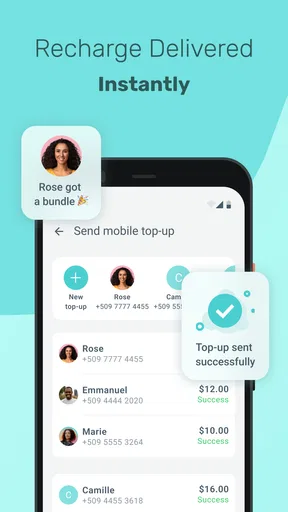
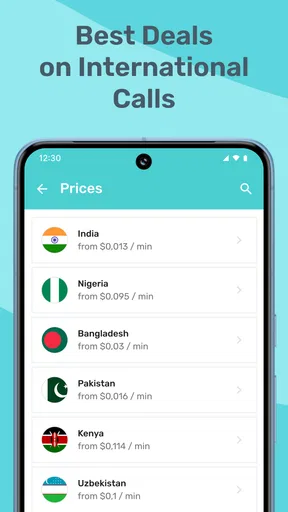
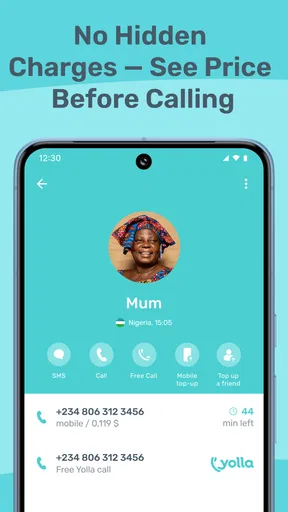
One cool feature I noticed is the ability to see call rates before you dial. This transparency is something I totally appreciate. You can also send credits to your friends, which is a nifty way to share the love, especially if they aren’t familiar with Yolla yet.
Seeing the rate first is especially helpful when your calls vary in length. Before a catch-up that could stretch on, I’d check the destination rate and decide whether a phone call is worth the spend or whether a messaging app would do. Sending credits can also help a family member get started, but it’s still worth making sure they know how to use the service and that it suits their needs rather than assuming a credit gift solves every setup question.
Cost Efficiency
Let’s talk money because that’s what we’re here for, right? Yolla offers competitive rates that are hard to beat. Compared to traditional carriers, you’ll definitely save a few bucks. There are no hidden fees, which is a relief. You only pay for the minutes you use. Plus, their recharge options are flexible, allowing you to top up as needed without committing to a pricey plan.
I wouldn’t assume every destination is equally inexpensive, though. International rates depend on where you’re calling, so the practical move is to check the rate for the exact country before you place a call and compare it with your own carrier’s international option. A low advertised rate for one destination doesn’t automatically make Yolla the cheapest choice for another.
Because the app uses calling credit, I’d also keep an eye on the balance when planning a longer conversation. A brief first call is a sensible way to learn how the service works before topping up more than you need. In-app purchases range from $0.99 to $35.99 per item, so the app is free to install, but using it for paid calls can involve spending money. I would treat a top-up as a deliberate purchase, not as an automatic subscription or a promise of a certain number of minutes.
This is where it differs from calling through a carrier plan: a carrier may be more convenient if international calls are already included in your package, while Yolla gives you a separate way to place calls and review destination rates. Internet-based voice apps can be cheaper for app-to-app conversations, but they require the other person to use a compatible service and have a data connection. Yolla’s phone-number approach is more useful when that requirement would get in the way.
Extra Features Worth Mentioning
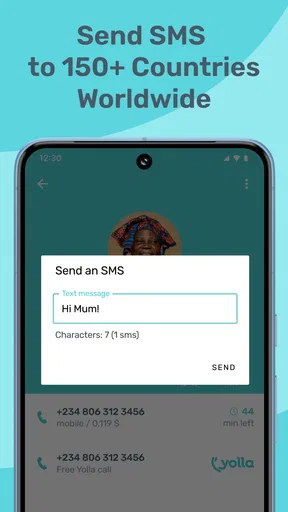
Aside from calls, Yolla also lets you send international texts. This feature isn’t as hyped as their calling capabilities, but it’s there if you need it. I tested it out and, yeah, it works just fine. The app also supports multiple languages, making it accessible to a broader audience.
I see texting as a useful fallback for short, practical messages, not necessarily a replacement for the messaging app a family already uses. For example, if I need to pass along a simple update to someone who can receive a text but doesn’t regularly check an internet chat service, the option is handy. For a long conversation, photos or ongoing group chats, I’d likely use a messaging app that is already part of our routine.
Security-wise, Yolla seems to be on the ball. They use encryption to protect your data, which is always a plus in today’s digital age.
For everyday privacy, I’d still follow the same common-sense approach I use with any calling app: check that I’m dialing the intended contact, keep account access under my control, and avoid discussing sensitive details in a place where other people can hear. Encryption is reassuring, but it doesn’t change the surroundings at either end of a call or make every communication choice risk-free.
When Yolla Fits—and When It Doesn’t
A realistic use case is calling a parent overseas who has a basic mobile phone and prefers voice calls to app messages. I can check the rate, place a short test call, and then use the same route for a longer catch-up if the connection and cost feel right. That is a more convincing reason to keep Yolla installed than simply having it available for a hypothetical emergency.
I’d also consider it for occasional calls to a shop, hotel or service provider abroad when I need to speak to a regular phone number. In that situation, an app-to-app voice call may not be possible because the business is not using the same messaging platform. Yolla’s phone-number focus is the useful distinction; the value still comes down to the rate and the quality of the internet connection at the moment I call.
On the other hand, I wouldn’t make it my first choice for someone who already has an affordable international allowance from their carrier, or whose most important calls happen where mobile data and Wi-Fi are unreliable. Nor is it necessarily the best fit for people who mainly exchange messages and only make occasional voice notes or app-to-app calls. In those cases, the familiar carrier plan or existing chat app may involve fewer steps.
A Few Practical Checks Before You Rely on It
If a call does not connect, I’d check the number and country code first, then confirm the internet connection and available calling credit. Those checks address common, fixable snags without assuming the app itself is at fault. I’d also make a second short attempt before deciding the service is unsuitable, especially if the first try happened in a place with weak reception.
If the other person cannot hear me clearly, I’d compare a call on Wi-Fi with one on mobile data when practical. That can reveal whether one connection is causing trouble. If the audio is still poor, a conventional carrier call may be the more dependable choice for that conversation; the lower-cost route is only useful when both sides can actually communicate comfortably.
Yolla is currently at version 4.79 and supports Android 8.0 or later. That makes it worth checking your device’s operating-system version before installing, particularly if you use an older phone. The app is free to get, but I’d still decide how I plan to use it before buying credit: occasional calls, frequent calls and calls to different destinations can lead to very different spending patterns.
Final Thoughts
Overall, Yolla is a solid choice if you’re frequently making international calls. It’s easy to use, cost-effective, and offers excellent call quality. While it doesn’t have all the bells and whistles of some other communication apps, it nails the basics superbly. If you’re tired of overpriced international rates, give Yolla a shot. It might just become your new go-to app for staying in touch with the folks across the globe.
My recommendation is to begin with one destination you call often, check its rate, and try a brief conversation before making Yolla part of your regular routine. That gives you a direct sense of the sound, the setup and the cost for your own situation. If those line up, it’s a convenient alternative for reaching people on ordinary phone numbers; if your calls are already covered or your connection is unreliable, sticking with your carrier or an app both people already use may be the better call.
Verdict
Strengths of Yolla: International Calling
- High-quality international calls
- User-friendly interface
- Affordable call rates
- No hidden fees
- Wide range of supported countries
Limitations of Yolla: International Calling
- Requires stable internet connection
- Occasional call drop issues
- Limited free credits
- No video call option
- Ads can be intrusive
Similar Picks in This Category
View All
Google Messages
Google LLC4.6

Gmail
Google LLC4.1

Google Meet
Google LLC4.4

Google Chrome
Google LLC4.1

WhatsApp Messenger
WhatsApp LLC4.6

Carrier Services
Google LLC4.2
Frequently Asked Questions
How does Yolla ensure call quality for international calls?
Yolla utilizes advanced VoIP technology to provide high-quality international calls. The app automatically selects the best available network, ensuring minimal lag and clear audio. With a robust infrastructure and regular updates, Yolla consistently optimizes its services to offer reliable connections in various regions worldwide.
What are the payment options available for Yolla credits?
Yolla offers multiple payment options to purchase credits, making it convenient for users globally. You can pay using credit/debit cards, PayPal, and even local payment systems depending on your region. The app also supports in-app purchases through Google Play and the Apple App Store, ensuring a seamless experience.
Is it possible to call non-Yolla users with the app?
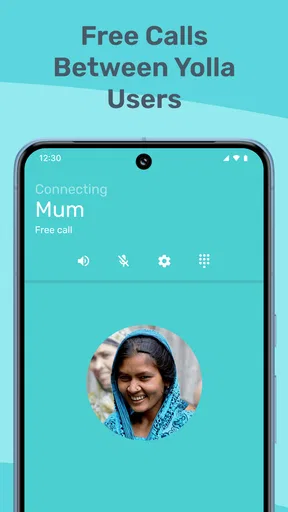
Yes, Yolla allows you to call any mobile or landline number worldwide, even if the recipient does not have the Yolla app. This feature extends Yolla’s utility beyond app-to-app calls, making it a versatile tool for staying connected internationally without requiring the recipient to download the app.
Are there any hidden fees associated with using Yolla?
Yolla prides itself on transparency, ensuring there are no hidden fees associated with its services. Users are charged per minute based on the destination they are calling, with rates clearly displayed before the call is made. Additionally, any applicable taxes or charges are included in the displayed rate, ensuring no surprises.
Can I use Yolla on multiple devices simultaneously?
Yolla supports usage on multiple devices; however, you can only be logged in on one device at a time. To switch devices, simply log out from the current device and log in on the new one. This feature ensures your account security while providing the flexibility to use Yolla on different devices.
